Picture this: you've just finished your third HTML and CSS tutorial.
The project worked. The instructor explained every line. You typed along, you understood what was happening, and when you hit "open in browser" the page looked exactly like the preview.
You open a new blank file to try building something yourself.
And you freeze.
You're not sure where to start. You can't remember if you need a <!DOCTYPE html> tag. You don't know what to call your stylesheet. You find yourself thinking: "I should probably watch one more tutorial first, just to make sure I have this down."
That's tutorial hell. And if you've been there, you're not alone, it's where most self-taught developers get stuck for months, sometimes years.
This article explains what's actually happening, why it traps smart people, and the exact steps to break out of it.
What Tutorial Hell Actually Is
Tutorial hell isn't about watching too many tutorials. It's about a specific learning pattern where the tutorial does all the cognitive work for you.
When you follow a tutorial, the instructor has already:
Decided what to build
Broken the project into steps
Figured out which concepts to introduce and in what order
Solved every decision point before you even know a decision was needed
Your job is to type what they type and understand as you go. That's genuinely useful for seeing new concepts in action. But it doesn't train the skill you actually need: deciding what to write next when no one is telling you.
Tutorial hell is the gap between "I can follow a walkthrough" and "I can build something from scratch." Most tutorials widen that gap without meaning to.
The core problem: following a tutorial feels almost identical to building something yourself, which is why the trap is so hard to notice. Both involve writing code that works. Only one of them builds independence.
Why Smart People Get Stuck in It
Tutorial hell isn't a sign of low ability. It's often a sign of the opposite, people who want to truly understand something before they try it, people who are anxious about wasting time on the wrong approach, people who equate watching an expert explain something with acquiring the expert's skill.
A few patterns that keep people stuck:
Enjoyed this? Get the weekly digest.
New articles and weekly highlights — no spam, unsubscribe anytime.
Frequently Asked Questions
What is tutorial hell?
Tutorial hell is the pattern of following coding tutorials endlessly without gaining the ability to build things independently. You finish a tutorial, the project works, you feel like you learned, but when you open a blank editor to build something yourself, you freeze. The tutorial walked you through every step; without it, you have no idea where to start. You go back to another tutorial, the cycle repeats, and months pass without real progress.
How do I know if I'm in tutorial hell?
Three reliable signs: (1) You've completed several tutorials but can't build a project from scratch without following another one. (2) You feel like you need to finish 'just one more' course or tutorial before you start building. (3) When you try to build something original, you freeze at a blank editor and immediately reach for a tutorial. If any of these sound familiar, you're in tutorial hell, and the exit is building, not more tutorials.
How long does it take to get out of tutorial hell?
Most people can break the cycle in 2–4 weeks of deliberate project building. The shift isn't about time, it's about changing what you do. The moment you stop watching tutorials and start building (even badly, even slowly), you're out of the cycle. The first project will be painful. The second will be hard. By the third or fourth, you'll notice that you're spending more time building than searching, and that's the turning point.
What should I build to escape tutorial hell?
Start with something small enough that you can hold the entire thing in your head: a personal landing page, a tip calculator, a colour-picker, a simple to-do list. The goal is not to impress anyone, it's to force yourself to make decisions without a tutorial telling you what to write next. Once you finish a small project, extend it: add a feature you weren't shown, change the design, break something and fix it. That process is the entire curriculum.
Is it OK to look things up when building a project?
Absolutely. Looking things up in documentation (MDN, official docs) is not tutorial hell, it's professional practice. The difference is between looking up a specific fact you don't remember ('what's the CSS property for italic text?') versus following a walkthrough that makes all the decisions for you. Developers at every level look things up constantly. The skill is knowing what to look up, not memorising syntax.
AI tools can supercharge how fast you learn to code, or they can become the most comfortable form of tutorial hell yet. Here's the honest method that actually works, and the traps to avoid.
freeCodeCamp is free and respected, but is it the right choice if you're a complete beginner with no coding experience? Here's an honest comparison of what each approach actually delivers, and how to pick the one that fits where you are right now.
The "one more" trap. There's always one more course, one more YouTube series, one more tutorial that feels like it will be the one that makes everything click. The problem is that the click you're waiting for only comes from building, not from more watching. You can't think your way into the skill, you have to build your way into it.
Mistaking understanding in the moment for retained knowledge. When an instructor explains something and it makes perfect sense, your brain registers that as learning. But recognition is not recall. You understood it in the context of having someone walk you through it. Thirty minutes later, in a blank editor, that understanding evaporates. The only way to convert recognition into recall is to reproduce the thing yourself, without the walkthrough visible.
Fear of writing "wrong" code. Many beginners believe that if they try to build without guidance, they'll build bad habits that will be hard to unlearn. This is much less of a problem than it sounds. Beginners write messy code. That's fine. The messy code teaches you what doesn't work. Professional developers write messy code on the first pass all the time, refactoring is a normal part of the job.
Treating completion as the goal. Tutorials have a finish state: the project works and matches the preview. When you build something yourself, there's no finish state beyond the one you define. That open-endedness is uncomfortable, and many people avoid it by returning to the structure tutorials provide.
The Actual Exit: Building Deliberately
There's no shortcut here. The exit from tutorial hell is building things, but there's a right and wrong way to do it.
Wrong way: open a blank file, stare at it, feel overwhelmed, close it, watch another tutorial.
Right way: pick a project small enough to start today, write the worst possible version of it, then improve it.
Here's the framework:
Step 1: Pick a Tiny Project You Actually Care About
The project needs to be small enough that you can hold the whole thing in your head, and concrete enough that you know what "done" looks like. Examples:
A personal landing page with your name, a bio, and one link
A tip calculator that takes a bill amount and outputs how much to tip
A colour picker that shows a box in whatever hex colour you type
A simple page that shows today's date and a random motivational quote
That's it. No dashboards, no social apps, no "Airbnb clone." One screen. One purpose. Something a visitor can look at and understand in three seconds.
The smaller the better. You're not building a portfolio piece yet. You're training the muscle.
Step 2: Write the Worst Possible Version First
Don't think about best practices. Don't think about whether your CSS is clean. Write the first version that does the thing, using whatever you know right now.
If you can only make a heading and a paragraph, make a heading and a paragraph. If you know enough CSS to change the font colour, change the font colour. Use what you have.
What you'll see at this stage: an ugly page that technically works. That's a win. That page came entirely from your decisions, nothing was handed to you. That's the skill you're building.
The ugliness doesn't matter. You're learning to navigate from intention to working code without a guide. That navigation skill is what tutorial hell never teaches you.
Step 3: Improve It One Piece at a Time
Once you have the terrible first version working, pick one thing to improve. Not ten things. One.
"I want to centre this heading." → You look up how to centre text in CSS. You find it. You apply it.
"I want the button to change colour when hovered." → You look up CSS :hover. You try it. It works.
"I want the background to be a gradient." → You look up CSS gradients. MDN has an example. You adapt it.
Each of these is a mini research-and-apply cycle. You're not following a tutorial, you're looking up a specific piece of information to solve a problem you ran into because you were building. That's the difference. The problem came from your building, not from someone else's script.
Tip: MDN Web Docs (developer.mozilla.org) is the right reference for HTML, CSS, and JavaScript. It's written for developers, it's accurate, and it has examples you can adapt. Get comfortable using it. Looking things up in MDN is not tutorial hell, it's professional practice.
Step 4: Extend It Beyond What You Were Shown
Once your first version works and you've improved a few things, push it beyond anything you've seen in a tutorial. Add a feature that wasn't in your original plan. Break something on purpose and fix it. Change the design entirely.
This step matters because it's where you discover you can do things you were never explicitly taught. You'll solve small problems by combining things you know. That's what programming actually is.
The Rule About Looking Things Up
There's a misconception that escaping tutorial hell means memorising everything and never looking anything up.
The opposite is true.
Professional developers look things up constantly. The goal is not to have all syntax memorised, it's to know what to look up and to be able to evaluate what you find.
Here's the distinction:
That's fine
That's the trap
Looking up "CSS flexbox justify-content values"
Following a flexbox tutorial walkthrough for a project someone else designed
Checking MDN for the correct fetch syntax
Asking AI to write your whole fetch call for you
Searching "how to add a Google Font to HTML"
Following a "build this website" tutorial just to see how fonts work
Looking up facts = research. Following a walkthrough = outsourcing the thinking. The first builds skill; the second doesn't.
What to Do When You Get Stuck for Real
Getting stuck while building your own project is different from getting stuck in tutorial hell. One is productive; the other is the trap.
When you genuinely can't move forward, here's the order of operations:
1. Read the error message slowly. Most beginners read the first three words and panic. Error messages often tell you exactly what's wrong, the file, the line, sometimes the fix. Read the whole thing.
2. Try to change one thing. A specific hypothesis ("maybe the problem is the quote marks here") is more useful than random changes. Form a guess, test it, observe what changes.
3. Search for the specific error message. Not "how do CSS grids work", the exact error text. Someone has had this problem before. Stack Overflow and MDN almost always have an answer.
4. Ask AI for an explanation, not a fix. If you ask "why does this error happen?" you get understanding. If you ask "fix my code," you get code you don't understand. The first keeps you in the driver's seat. After the explanation, close the chat and write the fix yourself.
5. Set it aside and come back. This sounds like giving up but it isn't. Sleeping on a problem activates different thinking. Many developers solve problems in the shower the next morning. The key is returning to it, not abandoning it for another tutorial.
A Note on Structured Learning (Without Tutorial Hell)
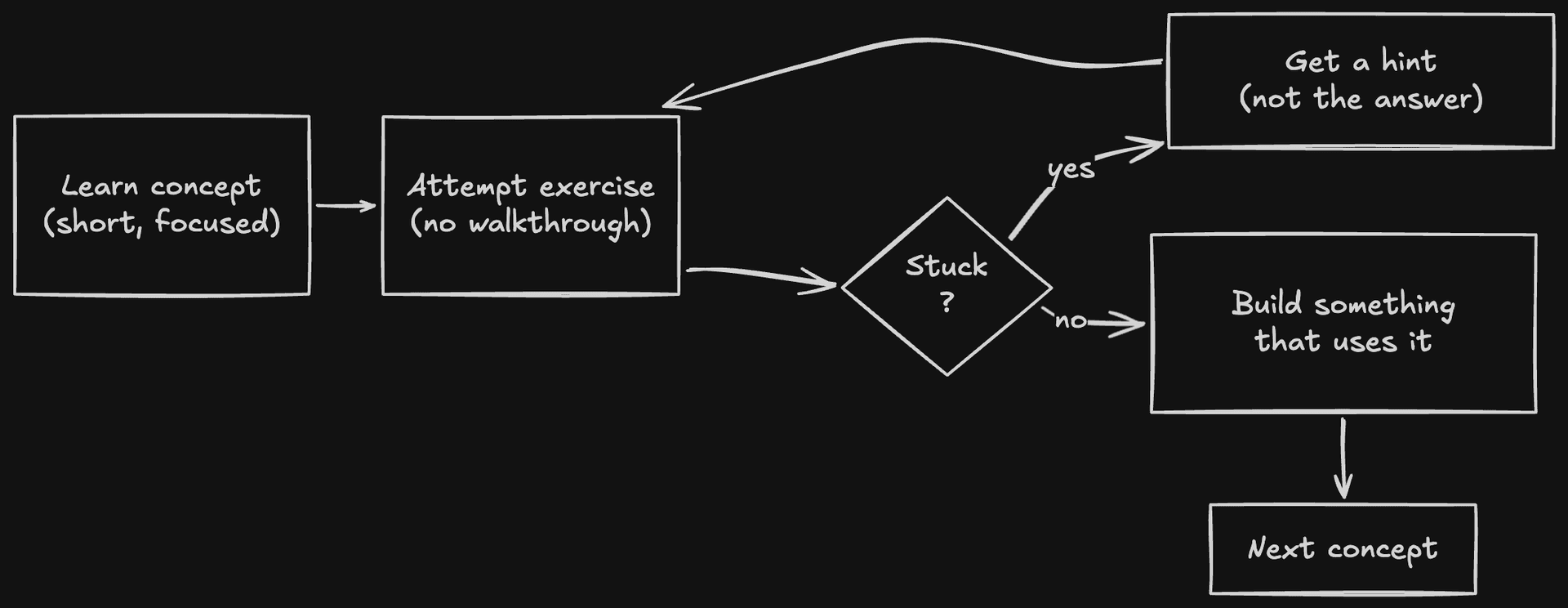
There's a version of guided learning that doesn't create tutorial hell: a structured resource that teaches you the minimum for each stage and then immediately pushes you into building.
The difference is what happens at the end of each section. Tutorial hell resources show you a completed project and let you reproduce it. Good structured resources give you a foundation, then give you a challenge you have to solve yourself, with hints, but not a walkthrough.
The flow looks like this:
That loop, learn, attempt, struggle, hint, solve, build, is what actually trains the independence you're looking for. The struggle in the middle is not a bug. It's the whole point.
The Zero to Website book and platform are built around this approach. Each chapter teaches you what you need to know, then gives you a challenge. The in-browser editor with AI tutor asks you guiding questions rather than writing the code for you. The goal from the start is building things, not finishing tutorials.
If you're starting from zero, that structure is genuinely helpful, not because it removes the hard work, but because it makes sure you do the right hard work in the right order.
Tutorial Hell and AI: A New Version of an Old Trap
AI tools have created a new variant of tutorial hell that's worth naming directly.
Instead of watching a tutorial, you ask ChatGPT or Claude to write the code. It does. You paste it in. It works. You feel productive.
Three months later, you still can't build anything without asking AI to write it for you.
This is tutorial hell with AI as the tutor. The same gap exists: you're getting working code without going through the process of producing it yourself, which means you're not building the skill of producing it yourself.
AI used this way is faster and more convenient than following a tutorial, which makes it a more comfortable trap.
The exit is the same: attempt the problem yourself first. Use AI to understand what went wrong, not to write the thing you were supposed to write. For a deeper look at using AI correctly while learning, the article on learning to code with AI covers this in detail.
The Uncomfortable Truth About Readiness
Most people who are stuck in tutorial hell are waiting to feel ready before they start building.
The feeling of readiness doesn't come from more preparation. It comes from the experience of having built something, even badly. The first project breaks the psychological barrier more than it teaches any technical concept.
You will make mistakes. Your code will be messy. You'll look at it three months from now and cringe. That's exactly where every working developer has been.
The path from tutorial hell to independence isn't a new course, a new resource, or one more explanation that finally makes everything click. It's one ugly project that you finish anyway.
Then another. Then another.
That's it.
Where to Start Today
If you're reading this and recognising the pattern, here's what to do this week, not "eventually," this week:
Pick a project from the list above or invent one of your own. It must fit on one screen.
Open your code editor (VS Code is free, code.visualstudio.com).
Write the worst possible version of it using only what you know right now.
When you get stuck, look up the specific thing you need. Don't follow a tutorial.
When it works, extend it once.
If you want a structured path that builds you toward real projects from zero, with an AI tutor that gives hints rather than answers, the Zero to Website book is designed exactly for this. It takes you from a blank editor to a deployed website in plain English, no experience required, building real things at every stage.
You don't need to feel ready. You need to open the file.
Yes, and this is the hardest part for most beginners to accept. You will never feel ready. The feeling of readiness comes from building, not from more preparation. If you know enough HTML to make a heading and a paragraph, that's enough to start a project. If you know enough CSS to change a font size and colour, that's enough to style something. Start with what you know and discover what you need to learn by running into real problems.
Can AI tools help me escape tutorial hell, or do they make it worse?
Both are possible, depending on how you use them. AI makes tutorial hell worse when you use it to write code for you, you still end up with working code you can't explain. AI helps you escape tutorial hell when you use it to understand things: ask why your code broke, ask what a concept means, ask for a practice problem to solve yourself. The rule is: AI for understanding, not for avoiding the work of understanding.
Do I need to finish a full course before building projects?
No. You need just enough foundation to attempt something, roughly 2–3 weeks of HTML, CSS, and basic JavaScript basics is more than enough to start your first project. Many beginners fall into the trap of trying to complete an entire curriculum before building, which is itself a form of tutorial hell. A good structured resource teaches you the minimum viable foundation for each stage, then pushes you into real building immediately. That's exactly the approach taken in the Zero to Website book and platform.
A step-by-step guide to building your first real website from scratch, no experience needed. You'll write HTML, add CSS styles, make things interactive with JavaScript, and deploy your site so the world can see it.